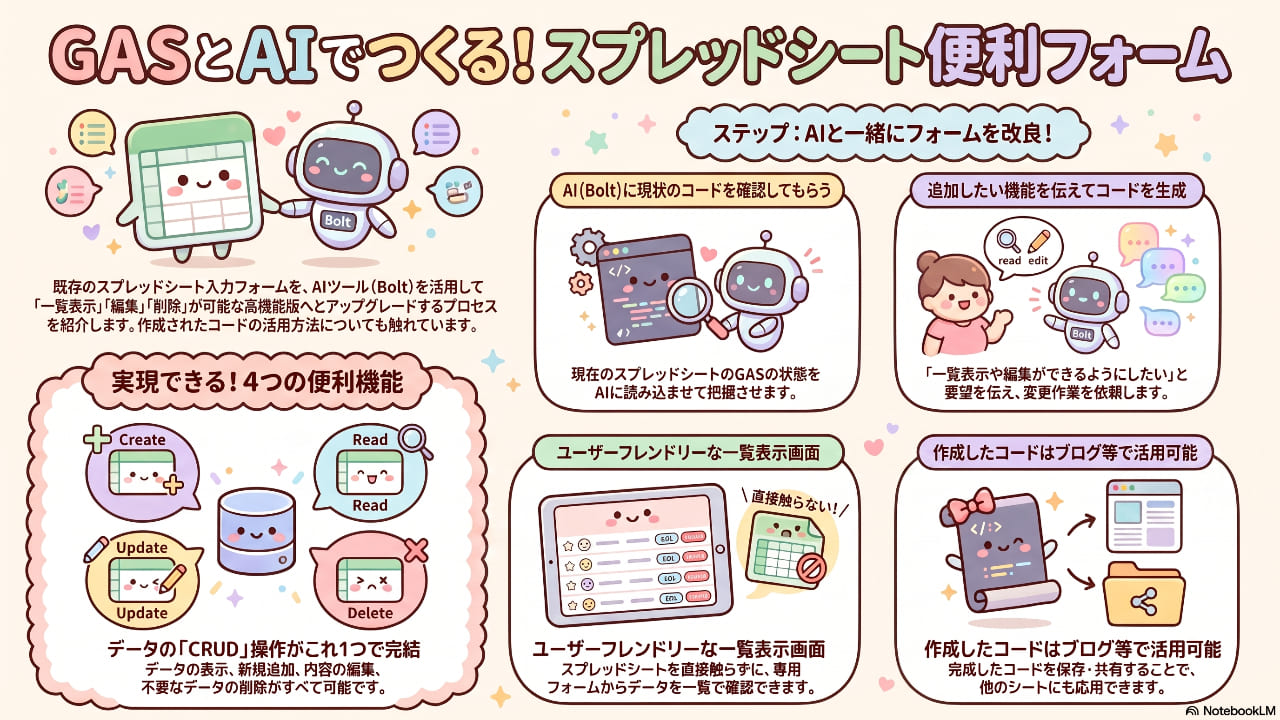
今回は、以前作成したシンプルなスプレッドシートの入力フォームを大幅にアップグレードする過程をご紹介しました。
ただ入力するだけでなく、「データの見える化」と「自由な編集」を可能にすることで、スプレッドシートの利便性を一気に高める内容になっています。
今回のアップデートでできるようになったこと
以前のフォームをベースに、以下の4つの機能を搭載した動的なフォームへ変更しました。
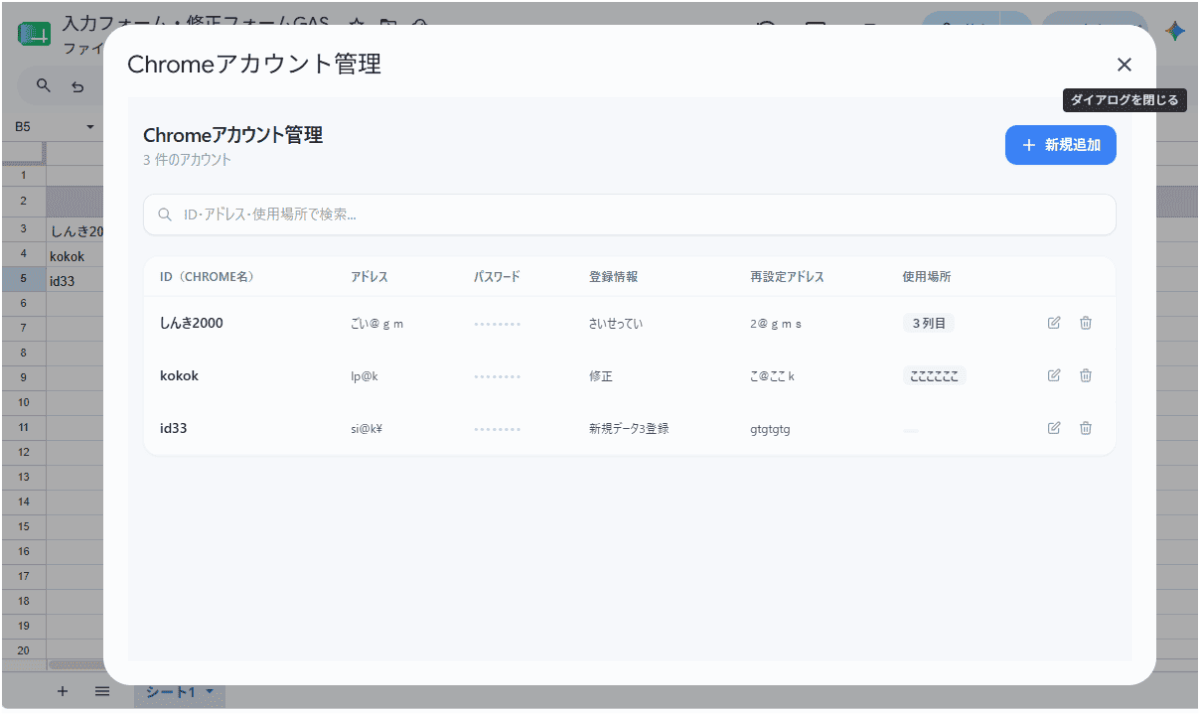
データの一覧表示: スプレッドシートに保存されているデータをフォーム上で確認できます。
新規追加: フォームから新しいデータを即座に登録できます。
データの編集: 既存のデータを呼び出して、内容を修正できます。
データの削除: 不要になったデータをフォームから直接削除できます。
bolt.newへの指示
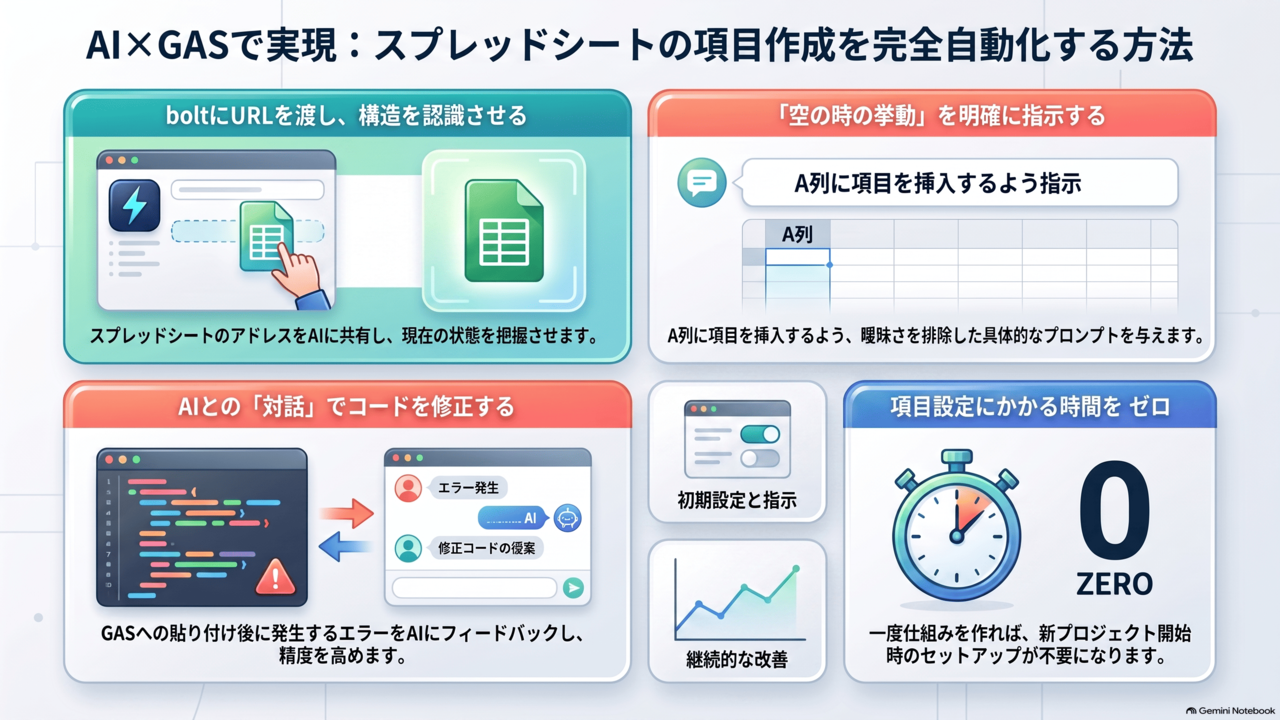
開発には、AIツール(動画内では「ボルト」と言及)を活用しました。
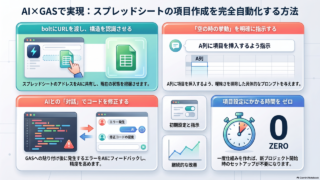
まず、現在のGoogle Apps Scriptの状態をAIに確認してもらいました。
下記URLはスプレッドシートでフォームでの入力等を行う設定です。
内容を詳しく分析して
スプレッドシートアドレス
コード.gsのコード内容
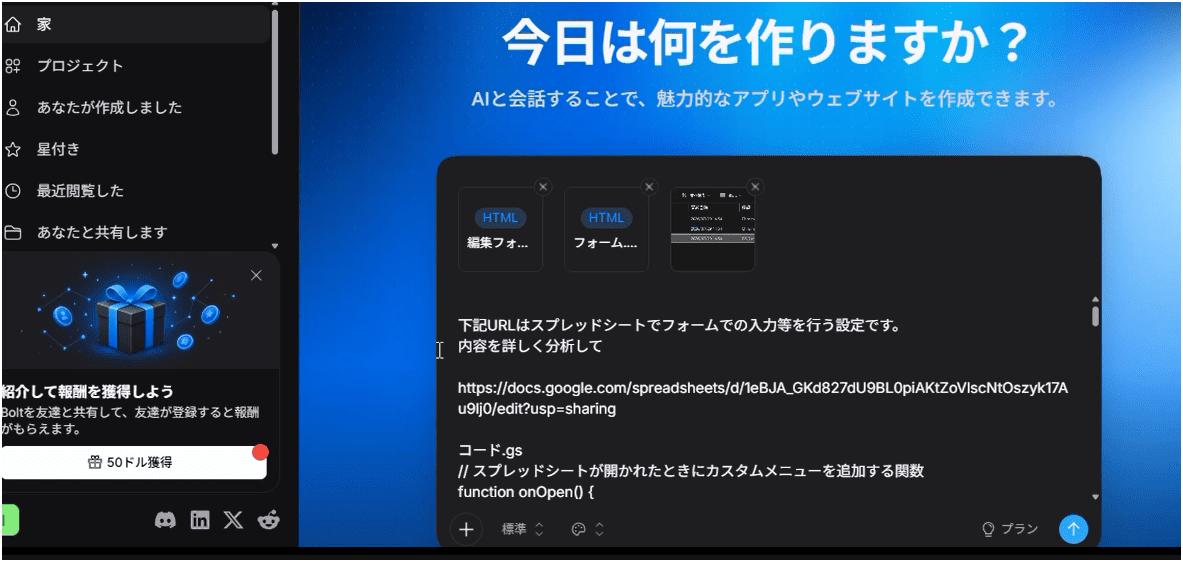
そこから「どのような機能を変更・追加したいか」を指示して作業を進めていくスタイルで作成しています。
「このGASの入力フォームを、モダンで使いやすいデザインに作り直してください。 1. デザイン: Tailwind CSSを使用して、清潔感のある白基調のカードスタイルにしてください。スマホでも操作しやすいレスポンシブ対応で。 2. 機能: スプレッドシートのデータを一覧表示し、新規追加、編集、削除ができるフォームを作成してください。 3. UIパーツ: 入力エラーのバリデーションや、保存時のアニメーション(ローディング)も追加してください。 4. 言語: 項目名、ボタン、アラートメッセージはすべて日本語にしてください。」
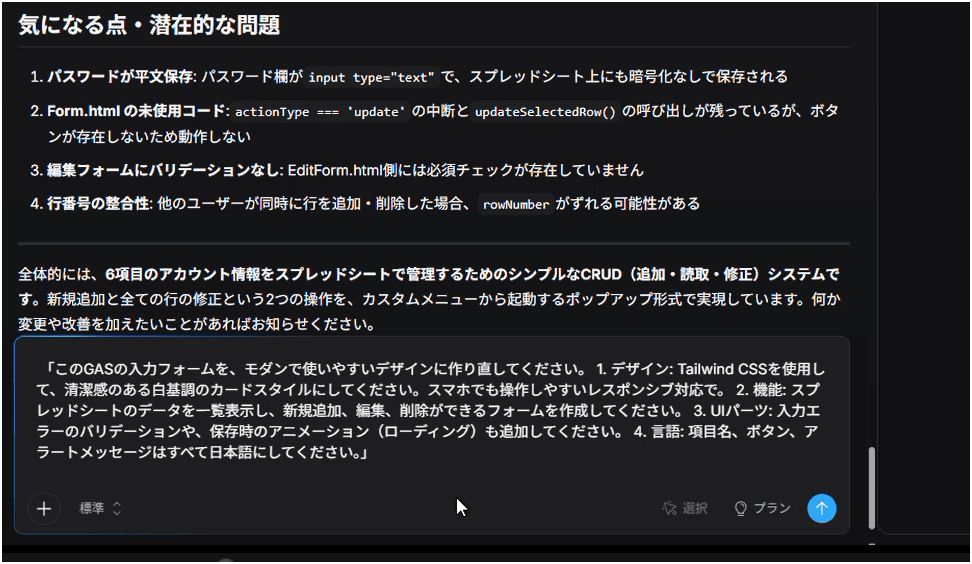
最新のツールを使うことで、複雑なCRUD(作成・読み取り・更新・削除)機能も効率的に実装することが可能になりました。
コードの公開について
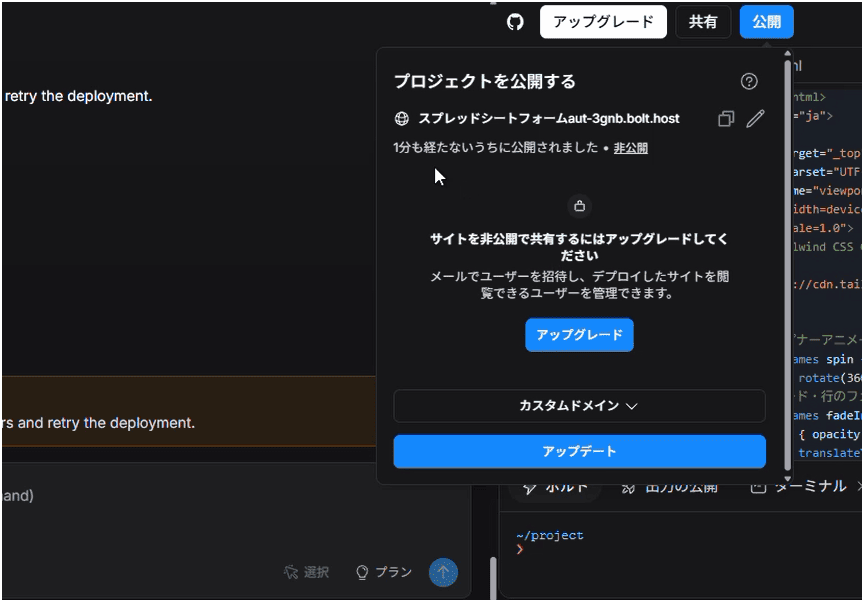
作成したコードについては、動画のツール上で直接公開しようと試みましたが、無料版の制限にかかったのか、エラーになりました。
有料プランにすると可能になるのではないでしょうか?
サンプルコード
「一覧表示・追加・編集・削除」を実現するための、一般的なGASのコードサンプルを以下に掲載します。
※このコードは一般的な実装例として作成したものです。ご自身のシート名や列に合わせて調整してください。
コード.gs
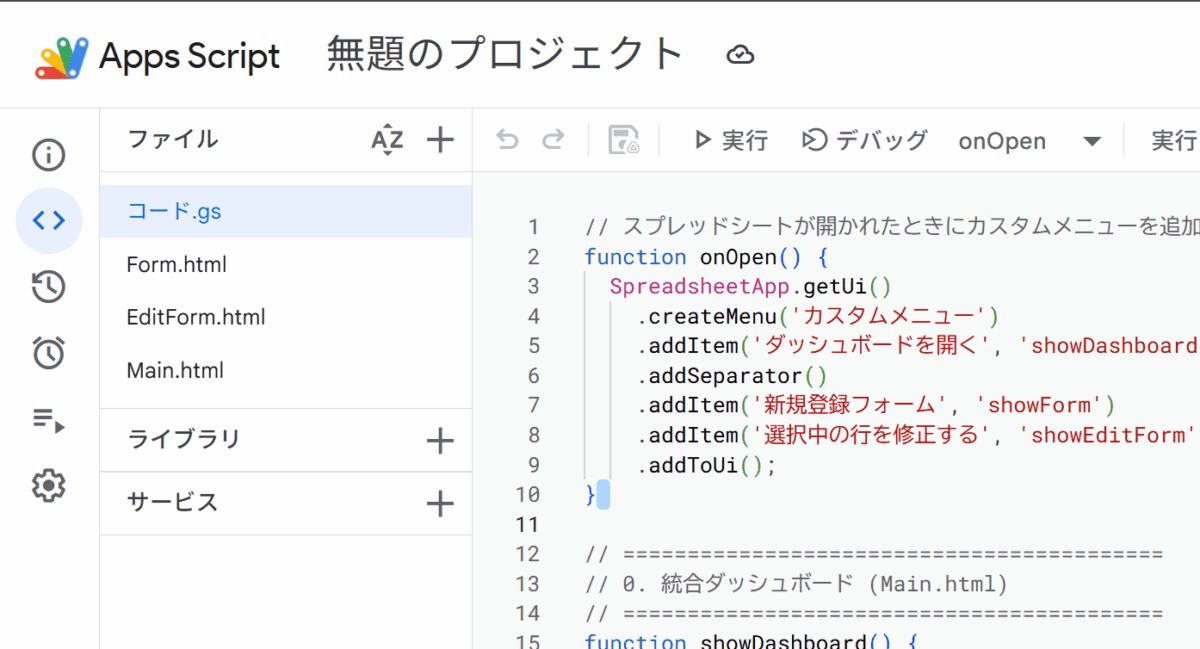
// スプレッドシートが開かれたときにカスタムメニューを追加する関数
function onOpen() {
  SpreadsheetApp.getUi()
    .createMenu('カスタムメニュー')
    .addItem('ダッシュボードを開く', 'showDashboard')       // 統合ダッシュボード(おすすめ)
    .addSeparator()
    .addItem('新規登録フォーム', 'showForm')                 // Form.html を開く
    .addItem('選択中の行を修正する', 'showEditForm')         // EditForm.html を開く
    .addToUi();
}

// ==========================================
// 0. 統合ダッシュボード (Main.html)
// ==========================================
function showDashboard() {
  const html = HtmlService.createHtmlOutputFromFile('Main')
      .setWidth(1200)
      .setHeight(700)
      .setTitle('Chromeアカウント管理');
  SpreadsheetApp.getUi().showModalDialog(html, 'Chromeアカウント管理');
}

// 全データを取得して Main.html に返す
function getAllRows() {
  const sheet = SpreadsheetApp.getActiveSpreadsheet().getActiveSheet();
  const lastRow = sheet.getLastRow();
  const lastCol = sheet.getLastColumn();

  // データなしの場合は空配列を返す
  if (lastRow <= 2) return [];

  // 3行目以降の全データを取得(1〜2行目は見出し)
  const values = sheet.getRange(3, 1, lastRow - 2, 6).getValues();

  // 行番号を付与してオブジェクトの配列に変換
  return values.map(function(row, i) {
    return {
      rowNum: i + 3,              // 実際のスプレッドシート行番号
      chromeId:        row[0],
      address:         row[1],
      password:        row[2],
      info:            row[3],
      recoveryAddress: row[4],
      location:        row[5]
    };
  });
}

// 行を削除する
function deleteRow(rowNum) {
  const sheet = SpreadsheetApp.getActiveSpreadsheet().getActiveSheet();
  const row = parseInt(rowNum, 10);
  // 見出し行のガード
  if (row <= 2) throw new Error('見出し行は削除できません');
  sheet.deleteRow(row);
}

// ==========================================
// 1. 新規登録フォーム用の処理 (Form.html)
// ==========================================
function showForm() {
  const htmlOutput = HtmlService.createHtmlOutputFromFile('Form')
      .setWidth(450)
      .setHeight(620)
      .setTitle('データ入力フォーム');
  SpreadsheetApp.getUi().showModalDialog(htmlOutput, '新規データ登録');
}

// データを末尾に追加
function addNewRow(formData) {
  const sheet = SpreadsheetApp.getActiveSpreadsheet().getActiveSheet();
  const rowData = [
    formData.chromeId,
    formData.address,
    formData.password,
    formData.info,
    formData.recoveryAddress,
    formData.location
  ];
  sheet.appendRow(rowData);
}

// ==========================================
// 2. 選択行の修正フォーム用の処理 (EditForm.html)
// ==========================================
function showEditForm() {
  const sheet = SpreadsheetApp.getActiveSpreadsheet().getActiveSheet();
  const activeRange = sheet.getActiveRange();
  const row = activeRange.getRow();

  if (row <= 2) {
    SpreadsheetApp.getUi().alert('修正したいデータの行を選択してください。');
    return;
  }

  const rowData = sheet.getRange(row, 1, 1, 6).getValues()[0];

  const template = HtmlService.createTemplateFromFile('EditForm');
  template.rowData = rowData;
  template.rowNum = row;

  const html = template.evaluate()
      .setWidth(450)
      .setHeight(620)
      .setTitle('行データの修正');

  SpreadsheetApp.getUi().showModalDialog(html, '選択行の情報を修正');
}

// 修正内容を上書き保存
function saveEditedRow(formData) {
  const sheet = SpreadsheetApp.getActiveSpreadsheet().getActiveSheet();
  const row = parseInt(formData.rowNumber, 10);

  const rowData = [
    formData.chromeId,
    formData.address,
    formData.password,
    formData.info,
    formData.recoveryAddress,
    formData.location
  ];

  sheet.getRange(row, 1, 1, 6).setValues([rowData]);
}
Form.html
<!DOCTYPE html>
<html lang="ja">
<head>
  <base target="_top">
  <meta charset="UTF-8">
  <meta name="viewport" content="width=device-width, initial-scale=1.0">
  <script src="https://cdn.tailwindcss.com"></script>
  <style>
    @keyframes spin { to { transform: rotate(360deg); } }
    .spinner { animation: spin 0.75s linear infinite; }
  </style>
</head>
<body class="bg-slate-50 font-sans p-4">

  <form id="inputForm" class="space-y-4">

    <!-- ID(必須) -->
    <div>
      <label class="block text-sm font-semibold text-slate-700 mb-1.5">
        ID(chrome名) <span class="text-red-500">*</span>
      </label>
      <input type="text" id="chromeId" name="chromeId"
             oninput="clearError()"
             class="w-full px-3 py-2.5 border border-slate-200 rounded-xl text-sm
                    focus:outline-none focus:ring-2 focus:ring-blue-400
                    focus:border-transparent transition bg-white"
             placeholder="例: work-account">
      <p id="err_chromeId"
         class="hidden text-red-500 text-xs mt-1.5 flex items-center gap-1">
        <svg class="w-3.5 h-3.5 shrink-0" fill="currentColor" viewBox="0 0 20 20">
          <path fill-rule="evenodd"
                d="M18 10a8 8 0 11-16 0 8 8 0 0116 0zm-7 4a1 1 0 11-2 0 1 1
                   0 012 0zm-1-9a1 1 0 00-1 1v4a1 1 0 102 0V6a1 1 0 00-1-1z"
                clip-rule="evenodd"/>
        </svg>
        IDは必須項目です
      </p>
    </div>

    <!-- アドレス -->
    <div>
      <label class="block text-sm font-semibold text-slate-700 mb-1.5">アドレス</label>
      <input type="text" id="address" name="address"
             class="w-full px-3 py-2.5 border border-slate-200 rounded-xl text-sm
                    focus:outline-none focus:ring-2 focus:ring-blue-400
                    focus:border-transparent transition bg-white"
             placeholder="例: example@gmail.com">
    </div>

    <!-- パスワード -->
    <div>
      <label class="block text-sm font-semibold text-slate-700 mb-1.5">パスワード</label>
      <div class="relative">
        <input type="password" id="password" name="password"
               class="w-full px-3 py-2.5 pr-10 border border-slate-200 rounded-xl text-sm
                      focus:outline-none focus:ring-2 focus:ring-blue-400
                      focus:border-transparent transition bg-white"
               placeholder="パスワードを入力">
        <!-- パスワード表示切り替えボタン -->
        <button type="button" onclick="togglePassword()"
                class="absolute right-3 top-1/2 -translate-y-1/2
                       text-slate-400 hover:text-slate-600 transition-colors">
          <svg class="w-4 h-4" fill="none" stroke="currentColor" viewBox="0 0 24 24">
            <path stroke-linecap="round" stroke-linejoin="round" stroke-width="2"
                  d="M15 12a3 3 0 11-6 0 3 3 0 016 0z"/>
            <path stroke-linecap="round" stroke-linejoin="round" stroke-width="2"
                  d="M2.458 12C3.732 7.943 7.523 5 12 5c4.478 0 8.268 2.943
                     9.542 7-1.274 4.057-5.064 7-9.542 7-4.477
                     0-8.268-2.943-9.542-7z"/>
          </svg>
        </button>
      </div>
    </div>

    <!-- 登録情報 -->
    <div>
      <label class="block text-sm font-semibold text-slate-700 mb-1.5">登録情報</label>
      <input type="text" id="info" name="info"
             class="w-full px-3 py-2.5 border border-slate-200 rounded-xl text-sm
                    focus:outline-none focus:ring-2 focus:ring-blue-400
                    focus:border-transparent transition bg-white"
             placeholder="登録情報を入力">
    </div>

    <!-- 再設定アドレス -->
    <div>
      <label class="block text-sm font-semibold text-slate-700 mb-1.5">再設定アドレス</label>
      <input type="text" id="recoveryAddress" name="recoveryAddress"
             class="w-full px-3 py-2.5 border border-slate-200 rounded-xl text-sm
                    focus:outline-none focus:ring-2 focus:ring-blue-400
                    focus:border-transparent transition bg-white"
             placeholder="例: recovery@example.com">
    </div>

    <!-- 使用場所 -->
    <div>
      <label class="block text-sm font-semibold text-slate-700 mb-1.5">使用場所</label>
      <input type="text" id="location" name="location"
             class="w-full px-3 py-2.5 border border-slate-200 rounded-xl text-sm
                    focus:outline-none focus:ring-2 focus:ring-blue-400
                    focus:border-transparent transition bg-white"
             placeholder="例: 本社PC・自宅">
    </div>

    <!-- ボタン群 -->
    <div class="flex gap-3 justify-end pt-2">
      <button type="button" onclick="google.script.host.close()"
              class="px-4 py-2.5 text-sm font-semibold text-slate-600
                     bg-slate-100 hover:bg-slate-200 rounded-xl transition-colors">
        閉じる
      </button>
      <button type="button" id="submitBtn" onclick="submitForm()"
              class="inline-flex items-center gap-2 px-5 py-2.5 text-sm font-semibold
                     text-white bg-blue-500 hover:bg-blue-600 rounded-xl
                     transition-colors disabled:opacity-60 disabled:cursor-not-allowed">
        <span id="submitSpinner"
              class="hidden w-4 h-4 border-2 border-white/30 border-t-white rounded-full spinner"></span>
        <span id="submitBtnText">新規追加</span>
      </button>
    </div>

  </form>

  <!-- 追加完了メッセージ -->
  <div id="successMsg"
       class="hidden mt-3 p-3 bg-emerald-50 border border-emerald-200 rounded-xl
              flex items-center gap-2 text-emerald-700 text-sm font-medium">
    <svg class="w-4 h-4 shrink-0" fill="none" stroke="currentColor" viewBox="0 0 24 24">
      <path stroke-linecap="round" stroke-linejoin="round" stroke-width="2.5" d="M5 13l4 4L19 7"/>
    </svg>
    追加しました!続けて入力できます
  </div>

  <script>
    function submitForm() {
      var form = document.getElementById('inputForm');
      var chromeId = form.chromeId.value.trim();

      // 必須チェック
      if (!chromeId) {
        document.getElementById('err_chromeId').classList.remove('hidden');
        form.chromeId.classList.add('border-red-400', 'ring-2', 'ring-red-100');
        form.chromeId.focus();
        return;
      }

      setBusy(true);

      google.script.run
        .withSuccessHandler(function() {
          setBusy(false);
          form.reset();
          // 完了メッセージを3秒表示
          var msg = document.getElementById('successMsg');
          msg.classList.remove('hidden');
          setTimeout(function() { msg.classList.add('hidden'); }, 3000);
        })
        .withFailureHandler(function(err) {
          setBusy(false);
          alert('エラーが発生しました: ' + (err.message || '不明なエラー'));
        })
        .addNewRow(form);
    }

    function clearError() {
      document.getElementById('err_chromeId').classList.add('hidden');
      document.getElementById('chromeId').classList.remove('border-red-400', 'ring-2', 'ring-red-100');
    }

    function togglePassword() {
      var input = document.getElementById('password');
      input.type = (input.type === 'password') ? 'text' : 'password';
    }

    function setBusy(busy) {
      document.getElementById('submitBtn').disabled = busy;
      document.getElementById('submitSpinner').classList.toggle('hidden', !busy);
      document.getElementById('submitBtnText').textContent = busy ? '追加中...' : '新規追加';
    }
  </script>
</body>
</html>
EditForm.html
<!DOCTYPE html>
<html lang="ja">
<head>
  <base target="_top">
  <meta charset="UTF-8">
  <meta name="viewport" content="width=device-width, initial-scale=1.0">
  <script src="https://cdn.tailwindcss.com"></script>
  <style>
    @keyframes spin { to { transform: rotate(360deg); } }
    .spinner { animation: spin 0.75s linear infinite; }
  </style>
</head>
<body class="bg-slate-50 font-sans p-4">

  <form id="editForm" class="space-y-4">

    <!-- 行番号(非保持フィールド) -->
    <input type="hidden" id="rowNumber" name="rowNumber" value="<?= rowData[0] ?>">
    <!-- ** 注意 **
         rowData[0] にはA列の値が入っていますが、行番号は rowNum という
         別の変数で渡されます。下のスクリプトで上書きして正しい行番号をセットします。 -->

    <!-- ID(必須) -->
    <div>
      <label class="block text-sm font-semibold text-slate-700 mb-1.5">
        ID(chrome名) <span class="text-red-500">*</span>
      </label>
      <input type="text" id="chromeId" name="chromeId"
             oninput="clearError()"
             class="w-full px-3 py-2.5 border border-slate-200 rounded-xl text-sm
                    focus:outline-none focus:ring-2 focus:ring-blue-400
                    focus:border-transparent transition bg-white"
             value="<?= rowData[0] ? rowData[0] : '' ?>"
             placeholder="例: work-account">
      <p id="err_chromeId"
         class="hidden text-red-500 text-xs mt-1.5 flex items-center gap-1">
        <svg class="w-3.5 h-3.5 shrink-0" fill="currentColor" viewBox="0 0 20 20">
          <path fill-rule="evenodd"
                d="M18 10a8 8 0 11-16 0 8 8 0 0116 0zm-7 4a1 1 0 11-2 0 1 1
                   0 012 0zm-1-9a1 1 0 00-1 1v4a1 1 0 102 0V6a1 1 0 00-1-1z"
                clip-rule="evenodd"/>
        </svg>
        IDは必須項目です
      </p>
    </div>

    <!-- アドレス -->
    <div>
      <label class="block text-sm font-semibold text-slate-700 mb-1.5">アドレス</label>
      <input type="text" id="address" name="address"
             class="w-full px-3 py-2.5 border border-slate-200 rounded-xl text-sm
                    focus:outline-none focus:ring-2 focus:ring-blue-400
                    focus:border-transparent transition bg-white"
             value="<?= rowData[1] ? rowData[1] : '' ?>"
             placeholder="例: example@gmail.com">
    </div>

    <!-- パスワード -->
    <div>
      <label class="block text-sm font-semibold text-slate-700 mb-1.5">パスワード</label>
      <div class="relative">
        <input type="password" id="password" name="password"
               class="w-full px-3 py-2.5 pr-10 border border-slate-200 rounded-xl text-sm
                      focus:outline-none focus:ring-2 focus:ring-blue-400
                      focus:border-transparent transition bg-white"
               value="<?= rowData[2] ? rowData[2] : '' ?>"
               placeholder="パスワードを入力">
        <button type="button" onclick="togglePassword()"
                class="absolute right-3 top-1/2 -translate-y-1/2
                       text-slate-400 hover:text-slate-600 transition-colors">
          <svg class="w-4 h-4" fill="none" stroke="currentColor" viewBox="0 0 24 24">
            <path stroke-linecap="round" stroke-linejoin="round" stroke-width="2"
                  d="M15 12a3 3 0 11-6 0 3 3 0 016 0z"/>
            <path stroke-linecap="round" stroke-linejoin="round" stroke-width="2"
                  d="M2.458 12C3.732 7.943 7.523 5 12 5c4.478 0 8.268 2.943
                     9.542 7-1.274 4.057-5.064 7-9.542 7-4.477
                     0-8.268-2.943-9.542-7z"/>
          </svg>
        </button>
      </div>
    </div>

    <!-- 登録情報 -->
    <div>
      <label class="block text-sm font-semibold text-slate-700 mb-1.5">登録情報</label>
      <input type="text" id="info" name="info"
             class="w-full px-3 py-2.5 border border-slate-200 rounded-xl text-sm
                    focus:outline-none focus:ring-2 focus:ring-blue-400
                    focus:border-transparent transition bg-white"
             value="<?= rowData[3] ? rowData[3] : '' ?>"
             placeholder="登録情報を入力">
    </div>

    <!-- 再設定アドレス -->
    <div>
      <label class="block text-sm font-semibold text-slate-700 mb-1.5">再設定アドレス</label>
      <input type="text" id="recoveryAddress" name="recoveryAddress"
             class="w-full px-3 py-2.5 border border-slate-200 rounded-xl text-sm
                    focus:outline-none focus:ring-2 focus:ring-blue-400
                    focus:border-transparent transition bg-white"
             value="<?= rowData[4] ? rowData[4] : '' ?>"
             placeholder="例: recovery@example.com">
    </div>

    <!-- 使用場所 -->
    <div>
      <label class="block text-sm font-semibold text-slate-700 mb-1.5">使用場所</label>
      <input type="text" id="location" name="location"
             class="whitespace-normal w-full px-3 py-2.5 border border-slate-200 rounded-xl text-sm
                    focus:outline-none focus:ring-2 focus:ring-blue-400
                    focus:border-transparent transition bg-white"
             value="<?= rowData[5] ? rowData[5] : '' ?>"
             placeholder="例: 本社PC・自宅">
    </div>

    <!-- ボタン群 -->
    <div class="flex gap-3 justify-end pt-2">
      <button type="button" onclick="google.script.host.close()"
              class="px-4 py-2.5 text-sm font-semibold text-slate-600
                     bg-slate-100 hover:bg-slate-200 rounded-xl transition-colors">
        キャンセル
      </button>
      <button type="button" id="submitBtn" onclick="submitForm()"
              class="inline-flex items-center gap-2 px-5 py-2.5 text-sm font-semibold
                     text-white bg-blue-500 hover:bg-blue-600 rounded-xl
                     transition-colors disabled:opacity-60 disabled:cursor-not-allowed">
        <span id="submitSpinner"
              class="hidden w-4 h-4 border-2 border-white/30 border-t-white rounded-full spinner"></span>
        <span id="submitBtnText">修正を反映する</span>
      </button>
    </div>

  </form>

  <script>
    // 行番号は rowNum から取得(rowData[0] はID値)
    document.getElementById('rowNumber').value = '<?= rowNum ?>';

    function submitForm() {
      var form = document.getElementById('editForm');
      var chromeId = form.chromeId.value.trim();

      // 必須チェック
      if (!chromeId) {
        document.getElementById('err_chromeId').classList.remove('hidden');
        form.chromeId.classList.add('border-red-400', 'ring-2', 'ring-red-100');
        form.chromeId.focus();
        return;
      }

      setBusy(true);

      google.script.run
        .withSuccessHandler(function() {
          setBusy(false);
          // 成功メッセージを表示してから閉じる
          var btn = document.getElementById('submitBtnText');
          btn.textContent = '更新完了';
          btn.parentElement.classList.remove('bg-blue-500', 'hover:bg-blue-600');
          btn.parentElement.classList.add('bg-emerald-500');
          setTimeout(function() { google.script.host.close(); }, 600);
        })
        .withFailureHandler(function(err) {
          setBusy(false);
          alert('エラーが発生しました: ' + (err.message || '不明なエラー'));
        })
        .saveEditedRow(form);
    }

    function clearError() {
      document.getElementById('err_chromeId').classList.add('hidden');
      document.getElementById('chromeId').classList.remove('border-red-400', 'ring-2', 'ring-red-100');
    }

    function togglePassword() {
      var input = document.getElementById('password');
      input.type = (input.type === 'password') ? 'text' : 'password';
    }

    function setBusy(busy) {
      document.getElementById('submitBtn').disabled = busy;
      document.getElementById('submitSpinner').classList.toggle('hidden', !busy);
      document.getElementById('submitBtnText').textContent = busy ? '更新中...' : '修正を反映する';
    }
  </script>
</body>
</html>
Main.html
<!DOCTYPE html>
<html lang="ja">
<head>
<base target="_top">
<meta charset="UTF-8">
<meta name="viewport" content="width=device-width, initial-scale=1.0">
<!-- Tailwind CSS CDN -->
<script src="https://cdn.tailwindcss.com"></script>
<style>
/* スピナーアニメーション */
@keyframes spin { to { transform: rotate(360deg); } }
/* カード・行のフェードイン */
@keyframes fadeInUp {
from { opacity: 0; transform: translateY(6px); }
to { opacity: 1; transform: translateY(0); }
}
/* モーダルのスケールイン */
@keyframes scaleIn {
from { opacity: 0; transform: scale(0.95); }
to { opacity: 1; transform: scale(1); }
}
.spinner { animation: spin 0.75s linear infinite; }
.fade-in-up { animation: fadeInUp 0.2s ease-out both; }
.scale-in { animation: scaleIn 0.18s ease-out both; }
</style>
</head>
<body class="bg-slate-50 font-sans text-slate-800 min-h-screen">
<!-- ===== ローディングオーバーレイ ===== -->
<div id="loadingOverlay"
class="fixed inset-0 bg-white/80 backdrop-blur-sm flex items-center justify-center z-50">
<div class="flex flex-col items-center gap-3">
<div class="w-10 h-10 border-4 border-blue-100 border-t-blue-500 rounded-full spinner"></div>
<p class="text-slate-400 text-sm">読み込み中...</p>
</div>
</div>
<!-- ===== トースト通知 ===== -->
<div id="toast" class="fixed top-4 right-4 z-50 hidden">
<div id="toastInner"
class="flex items-center gap-2 px-4 py-3 rounded-xl shadow-lg text-white text-sm font-medium fade-in-up">
<span id="toastIcon"></span>
<span id="toastMsg"></span>
</div>
</div>
<!-- ===== メインコンテンツ ===== -->
<div class="max-w-6xl mx-auto p-4 pb-10">
<!-- ヘッダー -->
<div class="flex flex-wrap items-center justify-between gap-3 mb-6 pt-2">
<div>
<h1 class="text-xl font-bold text-slate-800 tracking-tight">Chromeアカウント管理</h1>
<p id="recordCount" class="text-slate-400 text-sm mt-0.5">— 件のアカウント</p>
</div>
<button onclick="openAddModal()"
class="inline-flex items-center gap-2 bg-blue-500 hover:bg-blue-600
active:bg-blue-700 text-white text-sm font-semibold
px-4 py-2.5 rounded-xl shadow-sm transition-colors">
<!-- プラスアイコン -->
<svg class="w-4 h-4" fill="none" stroke="currentColor" viewBox="0 0 24 24">
<path stroke-linecap="round" stroke-linejoin="round" stroke-width="2.5" d="M12 4v16m8-8H4"/>
</svg>
新規追加
</button>
</div>
<!-- 検索バー -->
<div class="relative mb-5">
<svg class="absolute left-3.5 top-1/2 -translate-y-1/2 w-4 h-4 text-slate-400 pointer-events-none"
fill="none" stroke="currentColor" viewBox="0 0 24 24">
<path stroke-linecap="round" stroke-linejoin="round" stroke-width="2"
d="M21 21l-6-6m2-5a7 7 0 11-14 0 7 7 0 0114 0z"/>
</svg>
<input type="text" id="searchInput" oninput="filterRows()"
placeholder="ID・アドレス・使用場所で検索..."
class="w-full pl-10 pr-4 py-2.5 bg-white border border-slate-200 rounded-xl
text-sm shadow-sm focus:outline-none focus:ring-2 focus:ring-blue-400
focus:border-transparent transition">
</div>
<!-- データテーブル(PC表示) -->
<div id="tableWrap"
class="hidden bg-white rounded-2xl shadow-sm border border-slate-100 overflow-hidden">
<div class="overflow-x-auto">
<table class="w-full text-sm">
<thead>
<tr class="bg-slate-50/80 border-b border-slate-100 text-xs uppercase tracking-wide">
<th class="text-left px-4 py-3 font-semibold text-slate-500">ID(chrome名)</th>
<th class="text-left px-4 py-3 font-semibold text-slate-500">アドレス</th>
<th class="text-left px-4 py-3 font-semibold text-slate-500">パスワード</th>
<th class="text-left px-4 py-3 font-semibold text-slate-500">登録情報</th>
<th class="text-left px-4 py-3 font-semibold text-slate-500">再設定アドレス</th>
<th class="text-left px-4 py-3 font-semibold text-slate-500">使用場所</th>
<th class="px-4 py-3 w-20"></th>
</tr>
</thead>
<tbody id="tableBody"></tbody>
</table>
</div>
</div>
<!-- 空状態 -->
<div id="emptyState" class="hidden text-center py-20">
<div class="w-16 h-16 bg-slate-100 rounded-2xl flex items-center justify-center mx-auto mb-4">
<svg class="w-8 h-8 text-slate-300" fill="none" stroke="currentColor" viewBox="0 0 24 24">
<path stroke-linecap="round" stroke-linejoin="round" stroke-width="1.5"
d="M9 12h6m-6 4h6m2 5H7a2 2 0 01-2-2V5a2 2 0 012-2h5.586
a1 1 0 01.707.293l5.414 5.414A1 1 0 0119 8.414V19a2 2 0 01-2 2z"/>
</svg>
</div>
<p class="text-slate-500 font-semibold">データがありません</p>
<p class="text-slate-400 text-sm mt-1">「新規追加」ボタンで登録を始めてください</p>
</div>
</div>
<!-- ===== 追加 / 編集モーダル ===== -->
<div id="formModal"
class="fixed inset-0 bg-black/40 backdrop-blur-sm flex items-center justify-center z-40 hidden p-4">
<div class="bg-white rounded-2xl shadow-2xl w-full max-w-md scale-in">
<!-- モーダルヘッダー -->
<div class="flex items-center justify-between px-6 py-4 border-b border-slate-100">
<h2 id="modalTitle" class="text-base font-bold text-slate-800">新規追加</h2>
<button onclick="closeFormModal()"
class="w-8 h-8 flex items-center justify-center rounded-lg
hover:bg-slate-100 text-slate-400 hover:text-slate-600 transition-colors">
<svg class="w-5 h-5" fill="none" stroke="currentColor" viewBox="0 0 24 24">
<path stroke-linecap="round" stroke-linejoin="round" stroke-width="2" d="M6 18L18 6M6 6l12 12"/>
</svg>
</button>
</div>
<!-- フォーム本体 -->
<div class="px-6 py-5 space-y-4 max-h-[60vh] overflow-y-auto">
<input type="hidden" id="editRowNum">
<!-- ID(必須) -->
<div>
<label class="block text-sm font-semibold text-slate-700 mb-1.5">
ID(chrome名) <span class="text-red-500">*</span>
</label>
<input type="text" id="f_chromeId"
oninput="clearFieldError('chromeId')"
class="w-full px-3 py-2.5 border border-slate-200 rounded-xl text-sm
focus:outline-none focus:ring-2 focus:ring-blue-400 focus:border-transparent transition"
placeholder="例: work-account">
<p id="err_chromeId" class="hidden text-red-500 text-xs mt-1.5 flex items-center gap-1">
<svg class="w-3.5 h-3.5 shrink-0" fill="currentColor" viewBox="0 0 20 20">
<path fill-rule="evenodd" d="M18 10a8 8 0 11-16 0 8 8 0 0116 0zm-7 4a1 1
0 11-2 0 1 1 0 012 0zm-1-9a1 1 0 00-1 1v4a1 1 0 102 0V6a1 1 0 00-1-1z"
clip-rule="evenodd"/>
</svg>
IDは必須項目です
</p>
</div>
<!-- アドレス -->
<div>
<label class="block text-sm font-semibold text-slate-700 mb-1.5">アドレス</label>
<input type="text" id="f_address"
class="w-full px-3 py-2.5 border border-slate-200 rounded-xl text-sm
focus:outline-none focus:ring-2 focus:ring-blue-400 focus:border-transparent transition"
placeholder="例: example@gmail.com">
</div>
<!-- パスワード(表示切り替えボタン付き) -->
<div>
<label class="block text-sm font-semibold text-slate-700 mb-1.5">パスワード</label>
<div class="relative">
<input type="password" id="f_password"
class="w-full px-3 py-2.5 pr-10 border border-slate-200 rounded-xl text-sm
focus:outline-none focus:ring-2 focus:ring-blue-400 focus:border-transparent transition"
placeholder="パスワードを入力">
<button type="button" onclick="togglePassword()"
class="absolute right-3 top-1/2 -translate-y-1/2 text-slate-400 hover:text-slate-600 transition-colors">
<svg id="eyeIcon" class="w-4 h-4" fill="none" stroke="currentColor" viewBox="0 0 24 24">
<path stroke-linecap="round" stroke-linejoin="round" stroke-width="2"
d="M15 12a3 3 0 11-6 0 3 3 0 016 0z"/>
<path stroke-linecap="round" stroke-linejoin="round" stroke-width="2"
d="M2.458 12C3.732 7.943 7.523 5 12 5c4.478 0 8.268 2.943
9.542 7-1.274 4.057-5.064 7-9.542 7-4.477
0-8.268-2.943-9.542-7z"/>
</svg>
</button>
</div>
</div>
<!-- 登録情報 -->
<div>
<label class="block text-sm font-semibold text-slate-700 mb-1.5">登録情報</label>
<input type="text" id="f_info"
class="w-full px-3 py-2.5 border border-slate-200 rounded-xl text-sm
focus:outline-none focus:ring-2 focus:ring-blue-400 focus:border-transparent transition"
placeholder="登録情報を入力">
</div>
<!-- 再設定アドレス -->
<div>
<label class="block text-sm font-semibold text-slate-700 mb-1.5">再設定アドレス</label>
<input type="text" id="f_recoveryAddress"
class="w-full px-3 py-2.5 border border-slate-200 rounded-xl text-sm
focus:outline-none focus:ring-2 focus:ring-blue-400 focus:border-transparent transition"
placeholder="例: recovery@example.com">
</div>
<!-- 使用場所 -->
<div>
<label class="block text-sm font-semibold text-slate-700 mb-1.5">使用場所</label>
<input type="text" id="f_location"
class="w-full px-3 py-2.5 border border-slate-200 rounded-xl text-sm
focus:outline-none focus:ring-2 focus:ring-blue-400 focus:border-transparent transition"
placeholder="例: 本社PC・自宅">
</div>
</div>
<!-- モーダルフッター -->
<div class="flex gap-3 justify-end px-6 py-4 border-t border-slate-100">
<button onclick="closeFormModal()"
class="px-4 py-2.5 text-sm font-semibold text-slate-600
bg-slate-100 hover:bg-slate-200 rounded-xl transition-colors">
キャンセル
</button>
<button id="submitBtn" onclick="submitForm()"
class="inline-flex items-center gap-2 px-5 py-2.5 text-sm font-semibold
text-white bg-blue-500 hover:bg-blue-600 rounded-xl transition-colors
disabled:opacity-60 disabled:cursor-not-allowed">
<span id="submitSpinner"
class="hidden w-4 h-4 border-2 border-white/30 border-t-white rounded-full spinner"></span>
<span id="submitBtnText">追加する</span>
</button>
</div>
</div>
</div>
<!-- ===== 削除確認モーダル ===== -->
<div id="deleteModal"
class="fixed inset-0 bg-black/40 backdrop-blur-sm flex items-center justify-center z-40 hidden p-4">
<div class="bg-white rounded-2xl shadow-2xl w-full max-w-sm scale-in">
<div class="p-6 text-center">
<!-- 警告アイコン -->
<div class="w-14 h-14 bg-red-50 rounded-2xl flex items-center justify-center mx-auto mb-4">
<svg class="w-7 h-7 text-red-500" fill="none" stroke="currentColor" viewBox="0 0 24 24">
<path stroke-linecap="round" stroke-linejoin="round" stroke-width="2"
d="M19 7l-.867 12.142A2 2 0 0116.138 21H7.862a2 2 0 01-1.995-1.858L5 7
m5 4v6m4-6v6m1-10V4a1 1 0 00-1-1h-4a1 1 0 00-1 1v3M4 7h16"/>
</svg>
</div>
<h3 class="text-base font-bold text-slate-800 mb-2">このデータを削除しますか?</h3>
<p id="deleteTargetLabel" class="text-sm text-slate-500 mb-6 leading-relaxed">
削除すると元に戻せません。
</p>
<div class="flex gap-3">
<button onclick="closeDeleteModal()"
class="flex-1 py-2.5 text-sm font-semibold text-slate-600
bg-slate-100 hover:bg-slate-200 rounded-xl transition-colors">
キャンセル
</button>
<button id="deleteBtn" onclick="confirmDelete()"
class="flex-1 inline-flex items-center justify-center gap-2 py-2.5 text-sm
font-semibold text-white bg-red-500 hover:bg-red-600 rounded-xl
transition-colors disabled:opacity-60 disabled:cursor-not-allowed">
<span id="deleteSpinner"
class="hidden w-4 h-4 border-2 border-white/30 border-t-white rounded-full spinner"></span>
削除する
</button>
</div>
</div>
</div>
</div>
<script>
// 全データを保持する配列
var allRows = [];
// 削除対象の行番号
var deleteTargetRowNum = null;
// 編集モードかどうか
var isEditMode = false;
// ========== 初期化 ==========
// ページ読み込み時にスプレッドシートのデータを取得
function loadData() {
showOverlay(true);
google.script.run
.withSuccessHandler(function(rows) {
allRows = rows || [];
renderTable(allRows);
showOverlay(false);
})
.withFailureHandler(function() {
showOverlay(false);
showToast('データの読み込みに失敗しました', 'error');
})
.getAllRows();
}
// ========== テーブル描画 ==========
function renderTable(rows) {
var tbody = document.getElementById('tableBody');
var wrap = document.getElementById('tableWrap');
var empty = document.getElementById('emptyState');
var count = document.getElementById('recordCount');
count.textContent = rows.length + ' 件のアカウント';
if (rows.length === 0) {
wrap.classList.add('hidden');
empty.classList.remove('hidden');
tbody.innerHTML = '';
return;
}
wrap.classList.remove('hidden');
empty.classList.add('hidden');
// 各行のHTMLを組み立て
tbody.innerHTML = rows.map(function(row, i) {
var delay = Math.min(i * 30, 300); // 行ごとの遅延(最大300ms)
return [
'<tr class="border-b border-slate-50 hover:bg-blue-50/30 transition-colors fade-in-up"',
' style="animation-delay:' + delay + 'ms">',
' <td class="px-4 py-3 font-semibold text-slate-800">' + esc(row.chromeId) + '</td>',
' <td class="px-4 py-3 text-slate-600 text-xs">' + esc(row.address) + '</td>',
' <!-- パスワードはマスク表示 -->',
' <td class="px-4 py-3 text-slate-300 tracking-widest text-xs">••••••••</td>',
' <td class="px-4 py-3 text-slate-600 text-xs">' + esc(row.info) + '</td>',
' <td class="px-4 py-3 text-slate-600 text-xs">' + esc(row.recoveryAddress) + '</td>',
' <td class="px-4 py-3">',
' <span class="inline-flex px-2 py-0.5 bg-slate-100 text-slate-600 rounded-md text-xs font-medium">',
esc(row.location),
' </span>',
' </td>',
' <td class="px-4 py-3">',
' <div class="flex items-center gap-1 justify-end">',
' <!-- 編集ボタン -->',
' <button onclick="openEditModal(' + row.rowNum + ')"',
' class="p-1.5 rounded-lg text-slate-400 hover:text-blue-500 hover:bg-blue-50 transition-colors"',
' title="編集">',
' <svg class="w-4 h-4" fill="none" stroke="currentColor" viewBox="0 0 24 24">',
' <path stroke-linecap="round" stroke-linejoin="round" stroke-width="2"',
' d="M11 5H6a2 2 0 00-2 2v11a2 2 0 002 2h11a2 2 0 002-2v-5',
' m-1.414-9.414a2 2 0 112.828 2.828L11.828 15H9v-2.828l8.586-8.586z"/>',
' </svg>',
' </button>',
' <!-- 削除ボタン -->',
' <button onclick="openDeleteModal(' + row.rowNum + ', \'' + esc(row.chromeId) + '\')"',
' class="p-1.5 rounded-lg text-slate-400 hover:text-red-500 hover:bg-red-50 transition-colors"',
' title="削除">',
' <svg class="w-4 h-4" fill="none" stroke="currentColor" viewBox="0 0 24 24">',
' <path stroke-linecap="round" stroke-linejoin="round" stroke-width="2"',
' d="M19 7l-.867 12.142A2 2 0 0116.138 21H7.862a2 2',
' 0 01-1.995-1.858L5 7m5 4v6m4-6v6m1-10V4a1 1 0',
' 00-1-1h-4a1 1 0 00-1 1v3M4 7h16"/>',
' </svg>',
' </button>',
' </div>',
' </td>',
'</tr>'
].join('');
}).join('');
}
// ========== 検索フィルター ==========
function filterRows() {
var q = document.getElementById('searchInput').value.toLowerCase().trim();
if (!q) {
renderTable(allRows);
return;
}
var filtered = allRows.filter(function(row) {
return (row.chromeId || '').toLowerCase().includes(q) ||
(row.address || '').toLowerCase().includes(q) ||
(row.info || '').toLowerCase().includes(q) ||
(row.location || '').toLowerCase().includes(q) ||
(row.recoveryAddress || '').toLowerCase().includes(q);
});
renderTable(filtered);
}
// ========== 追加モーダル ==========
function openAddModal() {
isEditMode = false;
document.getElementById('modalTitle').textContent = '新規追加';
document.getElementById('submitBtnText').textContent = '追加する';
clearForm();
document.getElementById('formModal').classList.remove('hidden');
setTimeout(function() { document.getElementById('f_chromeId').focus(); }, 50);
}
// ========== 編集モーダル ==========
function openEditModal(rowNum) {
// allRows から対象行を検索
var row = allRows.find(function(r) { return r.rowNum === rowNum; });
if (!row) { showToast('データが見つかりません', 'error'); return; }
isEditMode = true;
document.getElementById('modalTitle').textContent = '情報を修正';
document.getElementById('submitBtnText').textContent = '更新する';
document.getElementById('editRowNum').value = row.rowNum;
document.getElementById('f_chromeId').value = row.chromeId || '';
document.getElementById('f_address').value = row.address || '';
document.getElementById('f_password').value = row.password || '';
document.getElementById('f_info').value = row.info || '';
document.getElementById('f_recoveryAddress').value = row.recoveryAddress || '';
document.getElementById('f_location').value = row.location || '';
clearValidation();
document.getElementById('formModal').classList.remove('hidden');
}
function closeFormModal() {
document.getElementById('formModal').classList.add('hidden');
clearForm();
}
function clearForm() {
['chromeId','address','password','info','recoveryAddress','location'].forEach(function(id) {
document.getElementById('f_' + id).value = '';
});
document.getElementById('editRowNum').value = '';
clearValidation();
}
// ========== バリデーション ==========
function clearValidation() {
document.getElementById('err_chromeId').classList.add('hidden');
document.getElementById('f_chromeId').classList.remove('border-red-400', 'ring-2', 'ring-red-100');
}
function clearFieldError(field) {
document.getElementById('err_' + field).classList.add('hidden');
document.getElementById('f_' + field).classList.remove('border-red-400', 'ring-2', 'ring-red-100');
}
function showFieldError(field) {
document.getElementById('err_' + field).classList.remove('hidden');
var input = document.getElementById('f_' + field);
input.classList.add('border-red-400', 'ring-2', 'ring-red-100');
input.focus();
}
// ========== フォーム送信 ==========
function submitForm() {
var chromeId = document.getElementById('f_chromeId').value.trim();
// 必須チェック
if (!chromeId) {
showFieldError('chromeId');
return;
}
var formData = {
rowNumber: document.getElementById('editRowNum').value,
chromeId: chromeId,
address: document.getElementById('f_address').value.trim(),
password: document.getElementById('f_password').value,
info: document.getElementById('f_info').value.trim(),
recoveryAddress: document.getElementById('f_recoveryAddress').value.trim(),
location: document.getElementById('f_location').value.trim()
};
setSubmitBusy(true);
var fn = isEditMode ? 'saveEditedRow' : 'addNewRow';
var msg = isEditMode ? '更新しました' : '追加しました';
google.script.run
.withSuccessHandler(function() {
setSubmitBusy(false);
closeFormModal();
showToast(msg, 'success');
loadData(); // テーブルを再読み込み
})
.withFailureHandler(function() {
setSubmitBusy(false);
showToast('保存に失敗しました。もう一度お試しください', 'error');
})
[fn](formData);
}
// ========== 削除モーダル ==========
function openDeleteModal(rowNum, name) {
deleteTargetRowNum = rowNum;
document.getElementById('deleteTargetLabel').textContent =
'「' + name + '」を削除します。この操作は元に戻せません。';
document.getElementById('deleteModal').classList.remove('hidden');
}
function closeDeleteModal() {
deleteTargetRowNum = null;
document.getElementById('deleteModal').classList.add('hidden');
}
function confirmDelete() {
if (!deleteTargetRowNum) return;
setDeleteBusy(true);
google.script.run
.withSuccessHandler(function() {
setDeleteBusy(false);
closeDeleteModal();
showToast('削除しました', 'success');
loadData();
})
.withFailureHandler(function() {
setDeleteBusy(false);
showToast('削除に失敗しました', 'error');
})
.deleteRow(deleteTargetRowNum);
}
// ========== パスワード表示切り替え ==========
function togglePassword() {
var input = document.getElementById('f_password');
input.type = (input.type === 'password') ? 'text' : 'password';
}
// ========== UI ヘルパー ==========
function showOverlay(show) {
document.getElementById('loadingOverlay').style.display = show ? 'flex' : 'none';
}
function setSubmitBusy(busy) {
var btn = document.getElementById('submitBtn');
btn.disabled = busy;
document.getElementById('submitSpinner').classList.toggle('hidden', !busy);
}
function setDeleteBusy(busy) {
var btn = document.getElementById('deleteBtn');
btn.disabled = busy;
document.getElementById('deleteSpinner').classList.toggle('hidden', !busy);
}
var toastTimer;
function showToast(message, type) {
clearTimeout(toastTimer);
var inner = document.getElementById('toastInner');
var icon = document.getElementById('toastIcon');
var msg = document.getElementById('toastMsg');
msg.textContent = message;
// 色とアイコンを種別に応じて切り替え
if (type === 'success') {
inner.className = 'flex items-center gap-2 px-4 py-3 rounded-xl shadow-lg text-white text-sm font-medium fade-in-up bg-emerald-500';
icon.innerHTML = '<svg class="w-4 h-4 shrink-0" fill="none" stroke="currentColor" viewBox="0 0 24 24"><path stroke-linecap="round" stroke-linejoin="round" stroke-width="2.5" d="M5 13l4 4L19 7"/></svg>';
} else {
inner.className = 'flex items-center gap-2 px-4 py-3 rounded-xl shadow-lg text-white text-sm font-medium fade-in-up bg-red-500';
icon.innerHTML = '<svg class="w-4 h-4 shrink-0" fill="none" stroke="currentColor" viewBox="0 0 24 24"><path stroke-linecap="round" stroke-linejoin="round" stroke-width="2.5" d="M6 18L18 6M6 6l12 12"/></svg>';
}
document.getElementById('toast').classList.remove('hidden');
toastTimer = setTimeout(function() {
document.getElementById('toast').classList.add('hidden');
}, 3000);
}
// XSS 対策: 特殊文字をエスケープ
function esc(str) {
if (str === null || str === undefined) return '';
return String(str)
.replace(/&/g, '&')
.replace(/</g, '<')
.replace(/>/g, '>')
.replace(/"/g, '"')
.replace(/'/g, ''');
}
// ページ表示と同時にデータを読み込む
loadData();
</script>
</body>
</html>
コメント